
Exploring Agentic AI
Trying NOT to feel overwhelmed, FOMO, or fear with Agentic AI in education

I’ve been trying to do this post for a while, and at this point, I think it’s better to have a half-thought post to start the conversation than a fully fleshed one. I want to share a bit about my own usage and way-finding through some of the agentic AI tools I’ve been playing with. I shared a bit about what I’m doing in Awe Without Surrender, but want to go a little further here.
What is Agentic AI?
At its core, agentic AI are AI tools that have the ability to take action with digital tools and will do so once they’re given a sense of what it is that a human has requested and the human has given permission. They may open up programs, navigate browsers, build programs, make online purchases, or perform some sequence of actions. The user says “I want to build a website” and the agentic AI builds a plan, gathers tools, and builds it.
This is different from generative AI, which might have the user still making requests but having to take the code, pages, etc and moving it over to the website’s platform. Agentic AI cuts out that step.
There’s much more to this but that is the main part to understand. So many interesting and questionable things about these tools are the subject countless blogs, social media posts, and YouTube how-tos. In higher ed, we’re already seeing agentic AI raise questions about our online spaces (Exhibit A: Einstein, Exhibit B: Kerra). It’s all a lot.
Agentic AI can be so many things to so many people and it doesn’t help that MS CoPilot has a thing called “Agents” that doesn’t quite fit into agentic AI (or hasn’t, the least time I tried it); it aligns more with custom generative AI tools like “CustomGPT” or “Claude Projects” or “Gemini Gems” that you can provide specific instructions for the AI to consistently act a certain way.
My usage for now and I might recommend others to try this as well has been largely with ChatGPT Codex, Claude Code, and Claude CoWork. ChatGPT Codex can be downloaded as its own desktop app (it sits outside the ChatGPT app on its own) and Claude Code and Claude CoWork can be upgraded within the Claude desktop app (each site has easy installing directions).
Claude Code and ChatGPT Codex are relatively the same. They were designed for programmers but the non-programmer (like myself) have found them incredibly useful and easy enough to get started. Claude CoWork is more directed to the non-programmer. All of them all you to direct the AI to come up with a plan of execution around something you want to do and then execute it. All of them will prompt you when they need permissions to do something on your computer, and you have some degree of control to allow some actions all the time without being prompted by the AI (e.g., reading files requires permission, and you can blanket permission such things).
I’d provide instructions on getting up and getting started with these tools but the reality is, by the time that I do, features/guidance may have changed. I often am checking out YouTube videos about these new features. Whichever tool you use, it’s not bad to look for video updates once a week or two. I often pick up additional tips and strategies by doing this.
Now, the biggest caveat is that you are using an AI that doesn’t know what it is doing to do stuff on your computer that you do not fully understand. And that requires caution. The same kind of caution we exhibit when surfing online, going to sketchy sites, downloading questionable or unverifiable content. It can do harm. So, proceed with caution, be selective in what you experiment with, make sure you have things backed up, and if you can do this on a computer without sensitive information, all the better.
How have I been using it?
As I get into my use, I reiterate that I’m primarily talking about Claude Code, Claude Co-Work, or ChatGPT Codex. One of the first things a bajillion videos on agentic AI will tell you to do, because it is a light lift, super easy to achieve, and helps to communicate the tool’s value, is to tell your AI agent to go to your download folder and organize it. For many of us, that’s a pretty helpful task because our download folder can look like a clustered antique store with lots of interesting things but no clarity about what’s there and why (ok, maybe that’s just me).
You can give more instructions than “organize my download folder,” but by and large, that’s a good start on its own. My next step was to play around with the routine feature (called different things on different tools, but basically to make an action a recurring thing) and have it do that kind of organizing once a week.
It can organize and rename them pretty well to see and understand what’s in that folder. So that is a low-stakes but pretty useful to start trying out agentic AI.
One of the next things I did was go into a very large file collection, something other scholars may be quite familiar with: downloading and downloading PDFs of all sorts of research. I had a folder with easily over 1200 PDFs; all were randomly named. The first thing I did was make a copy of this folder before starting work, just in case it went horribly wrong.
I had Claude Code go in and rename all of the files according to the title of the article in the file. Most of these were journal articles, books, and so on. I renamed it so the title of the piece was the title of the article. If I wanted to, I could have also done the last name of the first author or the year of publication as part of the name. And like that, 1200 files were clearly named, making it easier to sense make of what was in front of me.
I took it a step further. I said, “Ok, take 100 random articles and based upon the content, title, abstract, keywords, etc, determine what would be the ideal 10-15 universal folders to organize these into. Keep in mind, it would be ok for have the same file in more than one folder (just make a copy of it). Give me a sense of what that structure would look like.” I also gave it a few categories that I knew right off the bat. This sample approach is really valuable in this work because you want to see what it can do and how far off before proceeding with a larger collection. It came back with a reasonable set of categories, and I adjusted one or two of them. I then told it to sort the rest of the collection accordingly. In the space of about 15 minutes altogether, I had 1,200 files named and organized well enough.
Now, “vibecoding” has been a thing for the past year, and I have dabbled in it. But with these newer tools, it became much easier and understandable why and how you might.
I proceeded to make some apps that I found to be helpful to me and started sharing them on GitHub.
Archive Routette: An app that surfaces random artifacts from the Internet Archive.
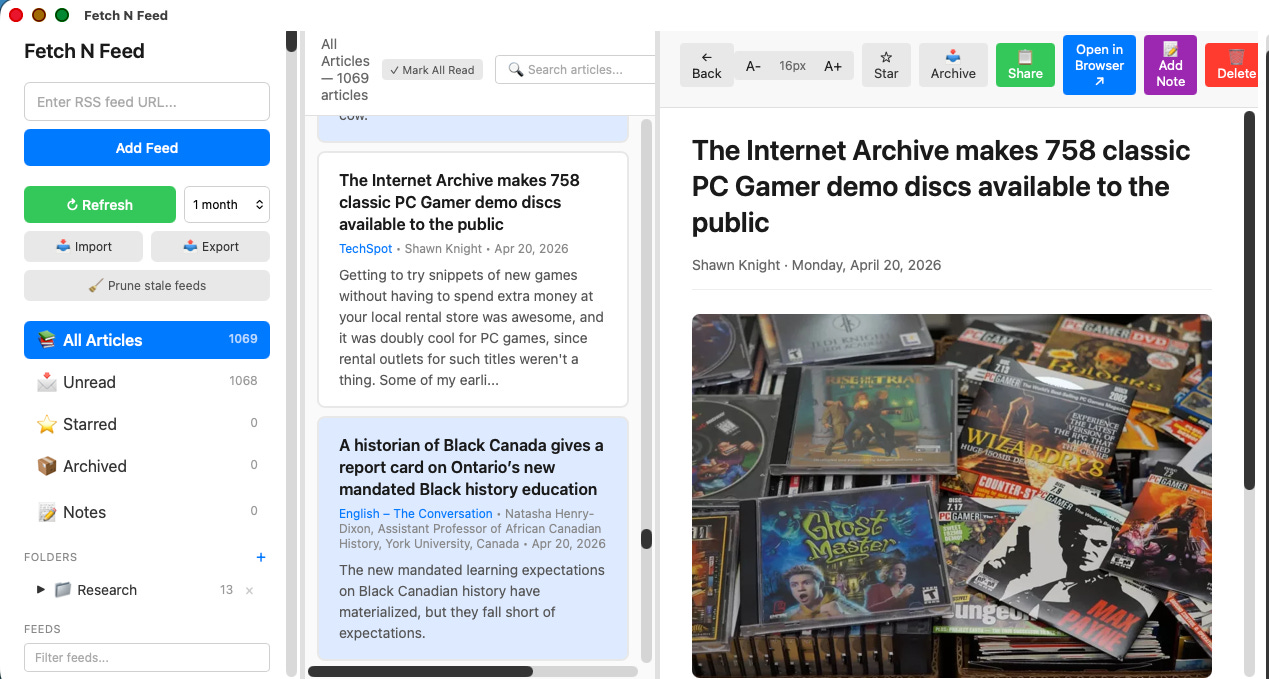
Fetch N Feed: An RSS Reader tool that includes save, notes, highlighting, and exporting.
Harmony: An app for playing MP3s on my computer.
PodVault: A podcast listening tool that allows for downloading, saving, taking notes, and creating playlists.
Now, how to get to making apps can sound overwhelming, and inevitably, there have been some hiccups in developing them; that’s part of the discovery process. But an easy way to get started is to go to a GenAI tool such as ChatGPT or Claude and say, “Interview me as if you are a software designer, and ask me about all the features I want around a piece of software related to X. Build out a design document that has all the key elements needed to make the program in [computer system]. Keep in mind that I will be using this design document with [Claude CoWork, ChatGPT Codex, Claude Code].” That output becomes a starting point for guiding the agentic AI.
After playing with these tools for a while, I’ve begun to think about and find other ways of using it. Sometimes, there are not amazing uses, but they are helpful to me, uses that leave me turning to these tools as I play more with them.
Sometimes, it changes workflows or introduces new ones. For instance, I can give a transcript with time stamps to a GenAI tool and ask for it to create chunks of a longer video that would make for useful shorter videos or just to break up the video. I have it identify the timestamps and proposed title. I can take that and go to ChatGPT Codex and tell it to break up the video file according to the time stamps and rename it accordingly. I can go one step further and tell it to add a specific video (e.g., a 15-second intro or exit) to the start or end; I could probably also do it in the middle, too. In five minutes, I now have the video chunked out and renamed.
Recently, I was taking a course, and I found that its structure was a bit challenging and the materials were at times too surface and too deep. The course is for people with very different profiles, but all with a deep interest in the topic. I took all the learning materials (200+ in total). I used agentic AI to do a semantic analysis of the content and build out a sense of what each learning material contained, and catalogue that in a spreadsheet. I then had it create a tag system for that context. I next had it create a matrix to see what items were strongly connected (e.g., 3 or more keyword terms).
Now, again, when I say I did this, I want to be clear. I ask the AI to do these things, and at times it suggested (i.e., my AI tools are set up to always ask clarifying questions first to help me understand what it is that I’m really asking.
Once I had some documentation about the connections of the context, I had AI create a document-reading program that allows for highlighting, notes, exporting, etc. But then I added the feature where whenever they open one document, they also receive recommendations about what else might be of interest to them. A very informal recommender system.
The current work that I’m doing is exploring how to better integrate my notes and writings from over the last two decades into one place and finding ways of creating links so that if I’m looking at one piece or writing, meeting note, or random thought that I’ve captured, I might be able to see what else it is connected to. That’s still in progress and will return to it in a future post.
What are some formative thoughts?
The generative AI movement definitely made me curious and intrigued, but not necessarily wowed by what it could do. I thought it was cool at times, and interesting, but not a lot of it made me pause or sit back and say, “Interesting .” But agentic AI definitely has given me a few wow moments. In particular, how it has been able to do things that I thought I would never be able to do that I wanted (e.g., organizing and cataloguing a 23,000-item digital library).
I want to be clear, though, and say that I still think so much of the tech-bro hype is exactly that. The promises, the extravagant claims about how it is going to change everything, are bullshit. But as I start to play with agentic AI, I can see the threads of the larger tales that they are spinning. I can understand how they leap from what agentic AI can do to promises of a techno-utopian future.
We can build and do things that feel quantifiably different, at scale. Several times now, on my train ride into Boston (about one hour), I give myself the challenge of identifying a problem, tension, or usage that I run into that can be addressed or mitigated with agentic AI. Sometimes, it’s making downloading things easier; other times, it’s creating a new widget for my desktop. But I typically have something working by the time I get off the train. That kind of ability feels different as does the idea that I can get closer to organizing my digital clutter automatically, giving me more time to engage with it rather than getting lost in what’s where and why is that file named that way.
I think getting to understand some of the basic things is pretty easy to do, but I, too, am getting a bit lost in the deep nuances and sophisticated use when we get to skills files, how to build them, test them, and deploy them. But maybe that’s just gonna take a minute, like wrapping my head around prompting.
What I’m grappling with most about agentic AI?
The thing I’m grappling with most about agentic AI right now is trying to find and understand its teaching and learning uses. I mentioned this on a podcast the other day.
I can definitely find a lot of productive and efficient uses for agentic AI. There is so much ground to cover and so many interesting, dynamic, different things we can do in that space. These are often things we couldn’t do before, couldn’t think to do, didn’t have the resources to do, or maybe we could have done them, but they would have taken a lot more time, especially when the barrier was a technical deficiency or limitation.
I appreciate that part of agentic AI. I’m intrigued by it. But the thing I keep grappling with, the thing I’ve been chewing on for six months, is: What does this tool look like when it comes to teaching and learning?
For me, enough evidence and examples exist that we can say there are learning-oriented ways to use generative AI in our classrooms. We can use it for simulations, reflections, critiques of outputs, and a variety of other activities that are part of the learning process.
When it comes to agentic AI, I’m not yet seeing clearly where this makes sense or what role it should play. Are you?
Agentic AI is very much oriented towards productivity and decreasing friction. Therefore, it is in tension with aspects of learning because learning often depends on tension, deliberation, and friction.
So what happens when you have a tool that is a force multiplier for de-friction in a space where you actually want intentional friction?
That’s what I’m grappling with. I know there are a million things to be concerned about here. Absolutely. There were also a million things to be concerned about with generative AI. But what got us through, or what feels like it is getting us through generative AI, are positive use cases. We are finding ways of saying, “Okay, it’s here. We know it’s here. How do we engage with it meaningfully?”
What is the equivalent of that for agentic AI? Do we have an answer yet?
The only thing I can think of is the example I gave previously, where I created my own learning space for a course I was taking. Maybe agentic AI becomes a way for students to pull together everything they are trying to do and create a workspace, a canvas, a tool, or a set of mechanisms that allow them to learn and engage more effectively.
Maybe students gather all their course materials and use agentic AI to prompt them, to email them, text them, notify them, or otherwise remind them: “By the way, you should be looking at this now.”
I can see it working in that way: decreasing organizational and contextual friction in order to help students focus on the learning. And I wonder if that is what agentic AI is going to be, or at least whether that is one useful way to think about it right now.
So that’s what I’ve got. This is my trip into agentic AI and my starting point for playing with it. I’d love to hear from people about where you are with this.
The Update Space
Upcoming Sightings & Shenanigans
Keynote speaker at the Reimagining the Liberal Arts in the Age of AI Conference, July 21-23 at the University of Mary Washington.
EDUCAUSE Online Program: Teaching with AI. Virtual. Facilitating sessions: ongoing
Recent Recordings, Resources, & Writings:
Davis, L., & Eaton, L. (May 2026). Expanding OER with GenAI. EDUCAUSE Review.
AI x Higher Ed Podcast with Anand Rao & Stefan Bauschard. Episode: Universities Must Adapt to AI—Here’s How They’re Doing It (May, 2026)
Damm, C., & Eaton, L. (2026, March). From prompt to practice: A framework for transparent GenAI use in higher education. EDUCAUSE Review.
Eaton, L., Nemeroff, A., & Sun, X. (2026). AI-assisted course design and development. In K. S. Ives, M. Cini, & R. Schroeder (Eds.), AI applications in online higher education administration: Strategies for maximizing returns and improving outcomes. Routledge.
Margin of Thought with Priten: Season 1, Episode 5: How Can We Center Pedagogy During the AI Tech Wave? (February 2026)
Online Learning in the Second Half with John Nash and Jason Johnston: EP 39 - The Higher Ed AI Solution: Good Pedagogy (January 2026)
The Peer Review Podcast with Sarah Bunin Benor and Mira Sucharov: Authentic Assessment: Co-Creating AI Policies with Students (December 2025)
David Bachman interviewed me on his Substack, Entropy Bonus (November 2025)
The AI Diatribe Podcast with Jason Low (November): Episode 17: Can Universities Keep Pace With AI?
The Opposite of Cheating Podcast with Dr. Tricia Bertram Gallant (October 2025): Season 2, Episode 31.
The Learning Stack Podcast with Thomas Thompson (August 2025). “(i)nnovations, AI, Pirates, and Access”.
Intentional Teaching Podcast with Derek Bruff (August 2025). Episode 73: Study Hall with Lance Eaton, Michelle D. Miller, and David Nelson.
Dissertation: Elbow Patches To Eye Patches: A Phenomenographic Study Of Scholarly Practices, Research Literature Access, And Academic Piracy
AI Syllabi Policy Repository: 200+ policies (always looking for more- submit your AI syllabus policy here)
Finally, if you are doing interesting things with AI in your higher ed classrooms, consider being interviewed for this Substack or even contributing. Complete this form, and I’ll get back to you soon!
We periodically host small-group workshops and leadership sessions for higher ed teams. You can learn more about our current offerings here.
AI+Edu=Simplified by Lance Eaton is licensed under Attribution-ShareAlike 4.0 International

I'm starting to use agentic AI to stand in as my first audience when I build something. We build a lot now with AI and vibe-coding, and getting to first user interaction is a really important milestone that teaches us a lot. For many reasons, we can't always get real users. So I'm asking agentic AI basically to take on a certain role and work with whatever I've built, without much more instruction than that. It's interesting to see where it interacts in a way that you expect, and where it deviates.
In education, I like this especially for rubrics. Building good, objective rubrics is hard. It requires a lot of sample inputs and then scoring those inputs. Agentic AI as user stand-ins can get a better rubric ready for real users more quickly.
Lance, thanks for sharing your experience w/ agentic AI. I'm just starting with Claude Cowork and cautious about having a "safe" folder with files that I carefully vet. I use DropBox predominantly for my personal & professional files but I think using a different platform such as OneDrive or Google Drive is safer, at least for me as a newbie. Do you have any advice on how to protect your files & PII?